Yep, we may get a tiny thank-you (read: commission) when you buy through
links on Autologr — not enough for a yacht, but enough to keep the lights (and
servers) on.
Learn more
What makes the XTRONS ACDVR2K01 click with car owners? It’s got 121 specs & performance worth checking out — we start with front camera resolution, wi-fi connectivity, hardwire kit & maximum supported storage.
A fast snapshot of the XTRONS ACDVR2K01, covering its standout specification and what you can expect right out of the box.
XTRONS ACDVR2K01
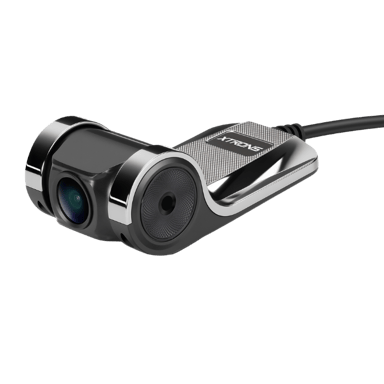
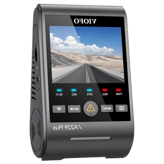
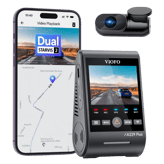
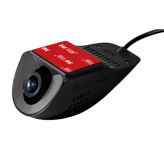
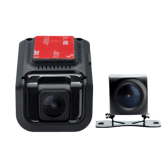
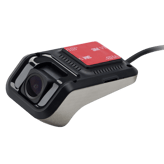
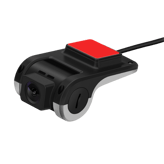
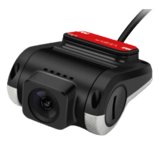
XTRONS ACDVR2K01 is a budget-friendly dash cam designed to work seamlessly with Android head units, offering a clean and integrated driving setup. It records in 2K QHD resolution, delivering sharper detail compared to standard Full HD, along with a 140° wide-angle lens for broader road coverage. Equipped with ADAS features and loop recording, it provides added safety alerts and continuous recording for both daily commutes and longer drives.
Quick Specs Breakdown
The key specs that actually matter—no fluff, no guesswork
Here’s a streamlined view of the XTRONS ACDVR2K01 key specifications. Compare critical features at a glance before exploring the full specs and hands-on insights below.
Video & Recording Performance
Front Camera Resolution
What is the front camera resolution?
1440p
Loop Recording
Does it support loop recording?
Yes
Night Vision Mode
Does it have night vision?
Yes
Connectivity & Smart Features
Wi-Fi Connectivity
Does it support Wi-Fi?
Yes
GPS Module
Does it have GPS?
Yes
Driver Assistance Alerts
Are driver assistance alerts included?
Yes
Power, Battery & Charging
Hardwire Kit
Is a hardwire kit supported?
Yes
Charging While Recording
Can it charge while recording?
Yes
Storage & File Management
Maximum Supported Storage
What is the maximum supported storage?
128 GB
General Information
Recording Purpose
What is the recording purpose?
Accident Evidence,Security Monitoring,Driving Records
Device Type
What type of device is this?
Dash Cam
Installation Location
Where is the dash cam installed?
Front Windshield,Dashboard
Safety, Security & Parking Protection
Lane Departure Alert
Does it have lane departure alerts?
Yes
Forward Collision Warning
Does it provide forward collision warnings?
Yes
Driver Fatigue Alert
Does it provide fatigue alerts?
Yes
Specifications & Facts
121
Specs measured. Drama avoided.
Is the XTRONS ACDVR2K01 the best choice in its class? You’ll find out here with full specs, comparisons to similar dash cams, and opinions from the community.
0
XTRONS ACDVR2K01
0
Votes
Front Windshield, Dashboard
Dash Cam in this range
Who knows?
(Help us out by suggesting one!)
Indicates the physical installation position inside the vehicle.
Don’t keep it to yourself — be the first to react and review the
Installation Location on XTRONS ACDVR2K01
◉ and help others decide!
XTRONS ACDVR2K01
Camera Configuration
What camera configuration does it use?
0
XTRONS ACDVR2K01
0
Votes
Front
Dash Cam in this range
Who knows?
(Help us out by suggesting one!)
XTRONS ACDVR2K01
The camera configuration is Front, so it records the forward-facing view only and does not include separate rear or interior channels.
This is ideal if your primary need is capturing road incidents ahead of the vehicle.
Indicates how many cameras and viewing angles are supported.
Don’t keep it to yourself — be the first to react and review the
Camera Configuration on XTRONS ACDVR2K01
◉ and help others decide!
XTRONS ACDVR2K01
Legal Compliance Mode
Does it support legal compliance features?
0
XTRONS ACDVR2K01
0
Votes
Audio Recording Toggle, Timestamp Control
Dash Cam in this range
Who knows?
(Help us out by suggesting one!)
XTRONS ACDVR2K01
Includes Audio Recording Toggle and Timestamp Control, allowing you to disable audio capture and adjust timestamp display for privacy or legal compliance.
These controls are useful when local regulations restrict in-cab audio or require anonymized recordings.
Supports compliance with local recording and privacy laws.
Don’t keep it to yourself — be the first to react and review the
Legal Compliance Mode on XTRONS ACDVR2K01
◉ and help others decide!
XTRONS ACDVR2K01
Operating Temperature Range
What temperature range does it support?
0
XTRONS ACDVR2K01
0
Votes
-4°F to 176°F
Dash Cam in this range
Who knows?
(Help us out by suggesting one!)
XTRONS ACDVR2K01
Rated operating temperature is -4°F to 176°F (-20°C to 80°C), suitable for extreme hot and cold environments many vehicles encounter.
This wide range helps ensure reliable operation in both winter and hot-summer regions.
Defines the temperature range where the dash cam operates reliably.
Don’t keep it to yourself — be the first to react and review the
Operating Temperature Range on XTRONS ACDVR2K01
◉ and help others decide!
XTRONS ACDVR2K01
Release Year
What year was it released?
0
XTRONS ACDVR2K01
0
Votes
2022
Dash Cam in this range
Who knows?
(Help us out by suggesting one!)
XTRONS ACDVR2K01
Release year: 2022, indicating the model and features align with recent dash-cam developments.
Confirm app compatibility and firmware updates for best performance.
Indicates the year the product model was released.
Don’t keep it to yourself — be the first to react and review the
Release Year on XTRONS ACDVR2K01
◉ and help others decide!
XTRONS ACDVR2K01
Mounting Type
How is the dash cam mounted?
0
XTRONS ACDVR2K01
0
Votes
Windshield
Dash Cam in this range
Who knows?
(Help us out by suggesting one!)
Describes where and how the dash cam is mounted in the vehicle.
Don’t keep it to yourself — be the first to react and review the
Mounting Type on XTRONS ACDVR2K01
◉ and help others decide!
XTRONS ACDVR2K01
Intended Vehicle Type
What vehicles is it intended for?
0
XTRONS ACDVR2K01
0
Votes
Car
Dash Cam in this range
Who knows?
(Help us out by suggesting one!)
Specifies the types of vehicles the dash cam is designed for.
Don’t keep it to yourself — be the first to react and review the
Intended Vehicle Type on XTRONS ACDVR2K01
◉ and help others decide!
XTRONS ACDVR2K01
Usage Mode
What is the intended usage mode?
0
XTRONS ACDVR2K01
0
Votes
Personal
Dash Cam in this range
Who knows?
(Help us out by suggesting one!)
Defines the primary usage scenario for the device.
Don’t keep it to yourself — be the first to react and review the
Usage Mode on XTRONS ACDVR2K01
◉ and help others decide!
XTRONS ACDVR2K01
Target User Type
Who is this dash cam for?
0
XTRONS ACDVR2K01
0
Votes
Daily Driver
Dash Cam in this range
Who knows?
(Help us out by suggesting one!)
Defines the primary user profile the dash cam is designed for.
Don’t keep it to yourself — be the first to react and review the
Target User Type on XTRONS ACDVR2K01
◉ and help others decide!
XTRONS ACDVR2K01
Operating Mode
How does the dash cam operate?
0
XTRONS ACDVR2K01
0
Votes
App-Controlled
Dash Cam in this range
Who knows?
(Help us out by suggesting one!)
Describes how the dash cam operates and is managed.
Don’t keep it to yourself — be the first to react and review the
Operating Mode on XTRONS ACDVR2K01
◉ and help others decide!
XTRONS ACDVR2K01
Power Source Type
What is the power source?
0
XTRONS ACDVR2K01
0
Votes
Vehicle Power
Dash Cam in this range
Who knows?
(Help us out by suggesting one!)
Identifies how the dash cam is powered.
Don’t keep it to yourself — be the first to react and review the
Power Source Type on XTRONS ACDVR2K01
◉ and help others decide!
Dash Cam in this range
Who knows?
(Help us out by suggesting one!)
XTRONS ACDVR2K01
Wi‑Fi connectivity is available, allowing direct connection between the camera and a smartphone app for live view, settings adjustment, and file transfer.
Using Wi‑Fi simplifies retrieving clips without removing the microSD card.
Indicates whether the dash cam supports Wi-Fi connectivity.
Don’t keep it to yourself — be the first to react and review the
Wi-Fi Connectivity on XTRONS ACDVR2K01
◉ and help others decide!
Dash Cam in this range
Who knows?
(Help us out by suggesting one!)
Provides alerts related to driving behavior or road conditions.
Don’t keep it to yourself — be the first to react and review the
Driver Assistance Alerts on XTRONS ACDVR2K01
◉ and help others decide!
XTRONS ACDVR2K01
Wi-Fi Frequency Band
Which Wi-Fi bands are supported?
0
XTRONS ACDVR2K01
0
Votes
2.4GHz
Dash Cam in this range
Who knows?
(Help us out by suggesting one!)
XTRONS ACDVR2K01
Wi‑Fi operates on the 2.4GHz band, which gives better range and wall penetration compared with 5GHz but with lower maximum throughput.
This is sufficient for live view and small video transfers to the app.
Specifies supported Wi-Fi bands for connection stability and speed.
Don’t keep it to yourself — be the first to react and review the
Wi-Fi Frequency Band on XTRONS ACDVR2K01
◉ and help others decide!
XTRONS ACDVR2K01
Cloud Connectivity
Does it support cloud connectivity?
No
0Votes
XTRONS ACDVR2K01
Dash Cam in this range
Who knows?
(Help us out by suggesting one!)
XTRONS ACDVR2K01
There is no cloud connectivity, meaning footage is stored locally on the microSD card or accessed via the mobile app only.
You won't have automatic cloud backups or remote live streaming features.
Allows footage upload and access via cloud services.
Don’t keep it to yourself — be the first to react and review the
Cloud Connectivity on XTRONS ACDVR2K01
◉ and help others decide!
XTRONS ACDVR2K01
Firmware Update Method
How are firmware updates performed?
0
XTRONS ACDVR2K01
0
Votes
App-Based, OTA
Dash Cam in this range
Who knows?
(Help us out by suggesting one!)
XTRONS ACDVR2K01
Firmware updates are delivered via App-Based methods and OTA, enabling easy update installation through the companion app or over-the-air when supported.
This removes the need to manually load firmware from an SD card.
Describes how firmware updates are delivered and installed.
Don’t keep it to yourself — be the first to react and review the
Firmware Update Method on XTRONS ACDVR2K01
◉ and help others decide!
XTRONS ACDVR2K01
Bluetooth Connectivity
Does it support Bluetooth?
Yes
0Votes
XTRONS ACDVR2K01
Dash Cam in this range
Who knows?
(Help us out by suggesting one!)
Enables short-range wireless communication with other devices.
Don’t keep it to yourself — be the first to react and review the
Bluetooth Connectivity on XTRONS ACDVR2K01
◉ and help others decide!
XTRONS ACDVR2K01
Mobile App Support
Is there a mobile app?
Yes
0Votes
XTRONS ACDVR2K01
Dash Cam in this range
Who knows?
(Help us out by suggesting one!)
Indicates compatibility with a companion mobile application.
Don’t keep it to yourself — be the first to react and review the
Mobile App Support on XTRONS ACDVR2K01
◉ and help others decide!
XTRONS ACDVR2K01
Live View via App
Can you view live footage in the app?
Yes
0Votes
XTRONS ACDVR2K01
Dash Cam in this range
Who knows?
(Help us out by suggesting one!)
Enables real-time camera viewing through the mobile app.
Don’t keep it to yourself — be the first to react and review the
Live View via App on XTRONS ACDVR2K01
◉ and help others decide!
XTRONS ACDVR2K01
GPS Speed Logging
Does it log driving speed?
Yes
0Votes
XTRONS ACDVR2K01
Dash Cam in this range
Who knows?
(Help us out by suggesting one!)
Records vehicle speed data alongside video footage.
Don’t keep it to yourself — be the first to react and review the
GPS Speed Logging on XTRONS ACDVR2K01
◉ and help others decide!
XTRONS ACDVR2K01
GPS Location Logging
Does it log GPS location?
Yes
0Votes
XTRONS ACDVR2K01
Dash Cam in this range
Who knows?
(Help us out by suggesting one!)
Captures location coordinates with recorded footage.
Don’t keep it to yourself — be the first to react and review the
GPS Location Logging on XTRONS ACDVR2K01
◉ and help others decide!
XTRONS ACDVR2K01
AI Event Detection
Does it use AI event detection?
No
0Votes
XTRONS ACDVR2K01
Dash Cam in this range
Who knows?
(Help us out by suggesting one!)
Uses AI to detect incidents like collisions or sudden braking.
Don’t keep it to yourself — be the first to react and review the
AI Event Detection on XTRONS ACDVR2K01
◉ and help others decide!
XTRONS ACDVR2K01
Video Download via App
Can videos be downloaded via the app?
Yes
0Votes
XTRONS ACDVR2K01
Dash Cam in this range
Who knows?
(Help us out by suggesting one!)
Allows recorded videos to be downloaded directly to a phone.
Don’t keep it to yourself — be the first to react and review the
Video Download via App on XTRONS ACDVR2K01
◉ and help others decide!
XTRONS ACDVR2K01
Smart Notifications
Are smart notifications supported?
Yes
0Votes
XTRONS ACDVR2K01
Dash Cam in this range
Who knows?
(Help us out by suggesting one!)
Sends alerts to the user for important events or incidents.
Don’t keep it to yourself — be the first to react and review the
Smart Notifications on XTRONS ACDVR2K01
◉ and help others decide!
Dash Cam in this range
Who knows?
(Help us out by suggesting one!)
XTRONS ACDVR2K01
A hardwire kit is available or supported, enabling permanent installation to the vehicle's fuse box for features like parking mode and battery-free operation.
Hardwiring can provide continuous power while the car is parked.
Indicates compatibility with a dedicated hardwire kit.
Don’t keep it to yourself — be the first to react and review the
Hardwire Kit on XTRONS ACDVR2K01
◉ and help others decide!
 Supermod
 Moderator